Installation
Roopik installs just like VS Code. Download the build for your OS and run the installer.
Windows
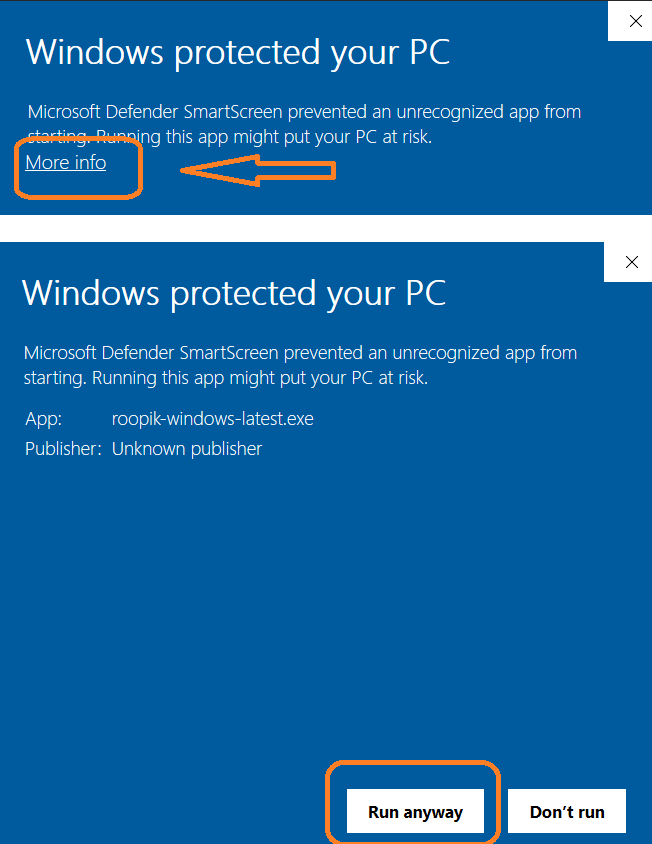
Download the installer and run it. If Windows shows a SmartScreen warning, click More info → Run anyway.
macOS
Download the .app and move it to Applications. We’re in the process of certifying the app through the Apple Developer Program. If the current build shows a warning, follow the steps below to allow it.
Update: Roopik IDE is now signed and verified under the Apple Developer Program.
Option 1 — .dmg (recommended)
Open roopik-macos-latest.dmg, drag Roopik into Applications, then launch it from Applications.
Option 2 — .app (direct)
Quick Start
sudo xattr -dr com.apple.quarantine /Applications/Roopik.app
# Then open Roopik from Applications
Linux (.deb)
Download the .deb package and install it using dpkg.
Quick Start
sudo dpkg -i roopik-linux-latest.deb
sudo apt-get -f install
Note: We're working to get all builds signed and certified. Until then, you can test the unsigned versions using the steps above and share feedback.